
 Contact
 Support
Instead of developing separate software to provide XSLT and XPath functionality to documents encoded in JSON we decided to extend our existing XML suite of tools (i.e., XJR) to accommodate more than XML documents. Once we had this ability we took one more step and applied this capability to another XPath enabled software in our product list (namely our XPath enabled Rule engine).
P6R’s suite of XML tools implement the XPath 2.0 and XSLT 2.0 standards. Excellent references to this functionality are: (1) M.Kay, XPath 2.0, Programmer’s Reference, 2004, Wiley Publishing, ISBN 0-7645-6910-4, and (2) M,Kay, XSLT 2.0, 3rd edition, Programmer’s Reference, Wiley Publishing, ISBN 0-7645-6909-0. The 2.0 versions of these standards represent a significant increase in functionality from their original versions (e.g., both have embedded regular expressions).
All of P6R’s products are written in C++. In addition to the XSLT and XPath products P6R’s XML suite consist of a SAX2-like XML parser, and a DOM XML tree parser which holds an XML document in a tree of nodes. For a reference on SAX2 see: D.Brownell, SAX2, O’Reilly, 2002, ISBN 0-596-00237-8. All of these components work together in the following way:
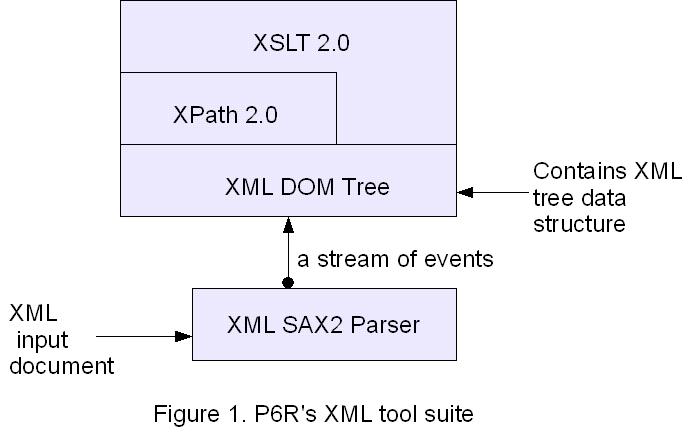
In figure 1, the XML input document is parsed by the SAX2 parser which sends events to the XML DOM Tree parser. The XML DOM tree has a SAX2 “content handler” that receives the SAX events (e.g., start of element, characters, …). The content handler makes calls to the XML DOM Tree API to create the nodes in the XML Tree. Once the XML document is totally parsed it is available via the XPath 2.0 API and the DOM tree API. It is important to realize that once the data is placed into the DOM tree its original format is basically invisible to the code above.
Next we decided that we wanted a JSON parser and thought that a SAX-like API (i.e., a stream of events such as start of object, and start of array) would be a unique and powerful tool. Such a JSON parser should fit into our XML architecture outlined above. So we built a SAX-like JSON parser and the tool suite became as follows:
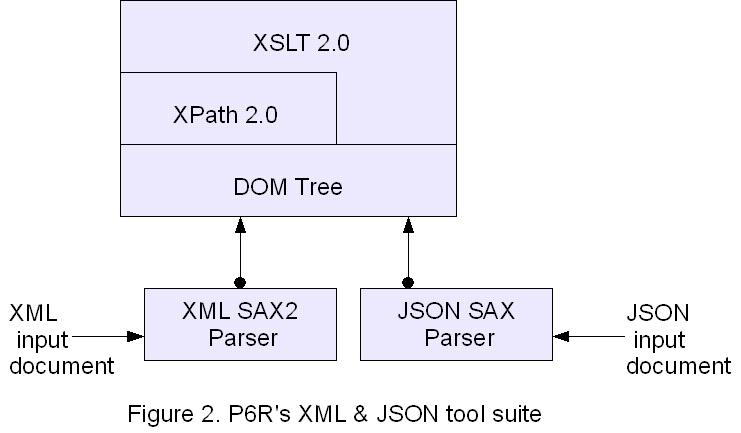
In figure 2, the new XML DOM Tree layer is renamed to just be DOM tree. The DOM tree layer is extended to also contain a JSON SAX parser “content handler” that receives the JSON events like “start of array”, and a series of “values”. See the JSON reference: http://www.json.org. This new JSON content handler takes the stream of JSON events and calls the DOM tree API to construct a tree data structure in the same basic way as the XML SAX2 content handler did. The end result is that above the DOM tree layer, the origin of the data (that is either XML or JSON) is mostly invisible (we describe a few exceptions to this below).
An XML document can have namespaces and attributes for its contained elements. See the XML standard reference: http://www.w3.org/TR/REC-xml/. However, its unclear how these concepts map to a JSON document. So in translating a JSON document into a DOM tree we took the approach that there are no attributes in a JSON document. Without some related JSON like “schema” its not possible to infer additional structure. Our goal was to be able to parse and represent as many JSON documents as possible.
An alternative approach could have been to translate a JSON document directly into an XML document and then just run the XML SAX parser against it. This was not chosen for two reasons. First, we wanted to built a native JSON parser anyway and the SAX approach was attractive to us. Second, converting the JSON to XML seems slow and unnecessary since the conversion requires a JSON parser anyway.
Recently we have extended our products by supporting JsonML http://www.jsonml.org. JsonML is designed to support the XML concept of attributes on an element. Also a JsonML document has a top level element. JsonML now supports a lossless conversion from / to XML.
At the XPath level, access to an element in a DOM tree, which came from a JSON source, requires a special root path. For example, given the following XML:
<menu>
   <lunch>
       <soup> ... </soup>
       <veggies> ... </veggies>
   </lunch>
</menu>
a typical XPath step expression could be “/menu/lunch/soup”, for the contents of the soup element. However, not all JSON documents have a top level name such as “menu”. For example, the following JSON document is perfectly legal:
{ "soup": "...",
   "veggies: "...",
   "dessert": "..."
}
In the above example, the top most “wrapper” does not have a name associated with it. In order to handle as many JSON documents as possible our implementation of the DOM tree for JSON was to give a name to the top most “{” “}” pair of any JSON document. That name is simply “JSON-document”. And so one XPath step expression to the example above becomes “/JSON-document/soup”. Given another example:
{ "menu": {
    "lunch": {
        "soup": "...",
        "veggies": "..."
    }
}
which is the previous XML example encoded in JSON. Now the similar XPath step expression would be “/JSON-document/menu/lunch/soup”. Other than this special top level path name and the lack of XML element attributes, all the functionality provided by XPATH 2.0 and XSLT 2.0 is available to any JSON encoded document.
XSLT defines several of its own support functions, such as key(), format-date(), document(), etc. The purpose of the “document()” function is to allow an XSLT script to include an external XML document, parse it and return the parsed XML tree back to the rest of the stylesheet. We took the implementation of this function one step further by allowing JSON encoded documents to be included via the document() function. Our implementation detects if the included document is JSON or XML and parses it accordingly. This proper parsing is done by checking the document’s MIME type, or for local files looking for the opening “{” of a JSON document. The cool thing with this feature is that now both XML and JSON documents can freely be mixed in the processing of a single XSLT stylesheet. Any XSLT operation that can be done on an XML document (e.g., xsl:copy) can also be done on an included JSON document.
At this point, we where very happy with the functionality we achieved. However, it became apparent that JSON support would be immediately available to any other software that used our XPath and DOM tree components. P6R’s Rule engine software uses our XPath and DOM tree components because the rules are defined in XML with XPath expressions. For example, a typical rule could look like:
<rule name='yellocar' setname='over1'>
     <if test='$Var1'/>
     <then>
        <set-variable name='$g3' select='/menu/dessert/item'/>
        <call func=\"setclickurl( 'www.p6r.com', $g3 )\" />
        <set-fact name='sunshine' select='15*4' location='/P6R:infer/mealitem' />
     </then>
</rule>
While this rule is defined in XML its input data (or “facts” in rule engine jargon) can be encoded in XML or JSON. And the JSON support comes for free. Without going into details on how the rule engine works the picture of the software layers now becomes:
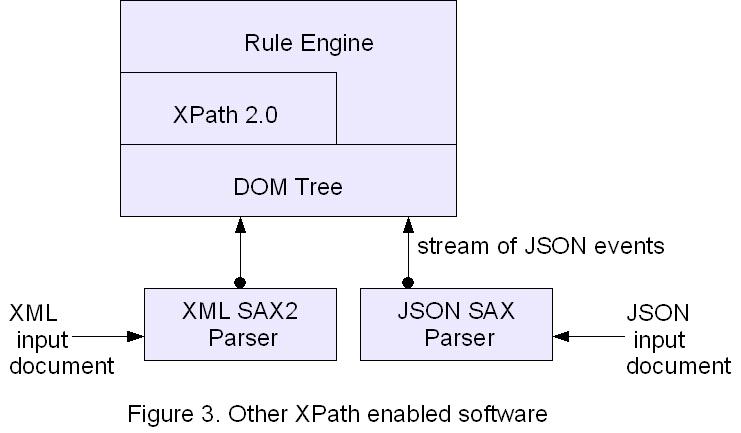
The main point we are making here is that any software that uses our XPath and DOM tree components are XML and JSON enabled with next to no effort.
Author: Mark K. Joseph, Ph.D.

On May 22nd, 2008 at 9:05 am An XPath Enabled Rule Engine | Project 6 Research - Articles said,
[...] Our XPath 2.0 supports stated facts defined in either XML or JSON , thus our Rule Engine is also JSON [...]
Link
On May 22nd, 2008 at 4:09 pm A SAX-like Parser for JSON | Project 6 Research - Articles said,
[...] 2.0 and XSLT 2.0 products. How the second goal was achieved is described in another P6R article: XSLT and XPath for JSON. We should note that our SAX-like JSON parser is fully implemented and is part of our P6Platform [...]
Link
On May 24th, 2008 at 7:30 am Phil Gibbs said,
Very useful – will evaluate.
Link
On October 3rd, 2011 at 2:29 pm Tyler said,
Project 6 Research,
I hate to break it to you, but you are wrong about the structure of JSON in general.
You assume that parse-able JSON is necessarily a document. This is false. JSON represents different types of data.
You further assume that all JSON “documents,” for instance, have a root-level curly-brace-pair. This is not necessarily the case. You could, for instance, be representing a naked array with JSON. It would use a square-bracket-pair instead.
I also find it horrible that all JSON XPath expressions would in general have to lead with “/JSON-document/” as that is a ridiculously long string – why not just use “/” as your root string and assume the rest?
And why not support arrays through adding integer offsets as keys?
For instance:
[ "a", "b", { "key": 9 }]
Xpath( “/0″ ) –> “a”
Xpath( “/2/key” ) –> 9
etc.
I really don’t see anything mind-blowing there, nor anything really that incompatible with the rest of your ideas.
Link
On October 3rd, 2011 at 2:52 pm Mark Joseph said,
>>I hate to break it to you, but you are wrong about the structure of JSON in general.
>>You assume that parse-able JSON is necessarily a document. This is false. JSON represents different types >>of data.
>>You further assume that all JSON “documents,” for instance, have a root-level curly-brace-pair. This is >>not necessarily the case. You could, for instance, be representing a naked array with JSON.
>>It would use a square-bracket-pair instead.
>>
Actually we use a document paradigm to simplify things but our parsing and XPATH handles all the cases you mention above. We do not assume that a JSON string starts with a curly brace pair. Our tools also support JsonML completely which is all array based with no problem. (We are referenced on the http://www.jsonml.com web site.) As a blog document there is limited space to show all the JSON forms we support.
>>
>>I also find it horrible that all JSON XPath expressions would in general have to lead
>>with “/JSON-document/” as that is a ridiculously long string – why not just use “/” as your root string
>>and assume the rest?
>>
I don’t much like this either it is a bit too long. XPath requires a root node which JSON does not have to have. This convention makes it easy to tell the XPath processor to handle that case.
>>
>>And why not support arrays through adding integer offsets as keys?
>>For instance:
>>[ "a", "b", { "key": 9 }]
>>Xpath( “/0″ ) –> “a”
>Xpath( “/2/key” ) –> 9
>>
I don’t believe what you propose is standard XPath. If it is please point me to where in the XPath standard document that you can specify an array index as a path element.
>>
>>
One thing you are missing. Our tools support XSLT and XPATH 2.0 which are significantly more powerful than the 1.0 versions. There still are not many 2.0 implementations out there. Our software allows JSON processing with the power of XPATH 2.0 expressions which include regular expressions. With the full JsonML support it is a powerful tool.
Link
On October 30th, 2015 at 2:48 am Python:How can I use python finding particular json value by key? – IT Sprite said,
[…] Maybe this is what you need? p6r.com/articles/2008/05/06/xslt-and-xpath-for-json […]
Link
On April 23rd, 2018 at 9:59 am XSLT equivalent for JSON – Knowleage Exchange said,
[…] a company which may have implemented something suitable […]
Link